The Update Argo CD Application Image Tags step is responsible for iterating over your Argo CD Application’s repository, and updating the image tag for referenced container images.
Container Images
Add package references for each container image you would like to update when you run your deployment. Unreferenced container images in your manifests will not be changed by Octopus.
When targeting a Helm-based application source, each referenced container image should have a populated Helm image tag path field. This is the YAML path to the specific field in your values file that contains the tag of the referenced container image (for example, agent.image.tag). This can be set in the Reference a package drawer when adding or editing a package reference. This is not required for directory or Kustomize sources.
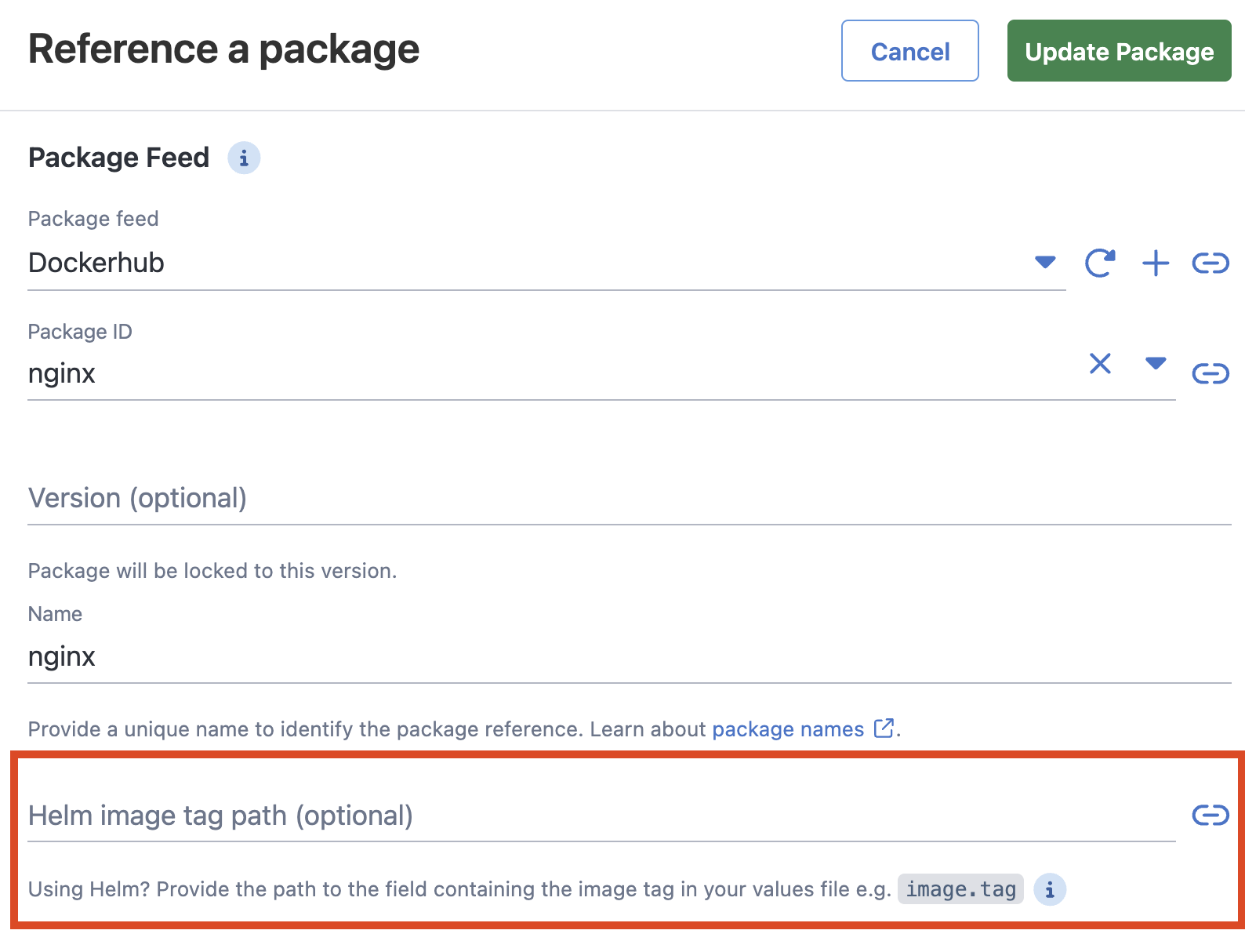
Config-as-Code / OCL: the Helm image tag path field maps to the HelmReplacementPath property on the package reference. In an OCL deployment process the property lives inside the package block alongside Purpose, Extract, etc.:
packages "my-image" {
    acquisition_location = "NotAcquired"
    feed                 = "<feed-id>"
    package_id           = "<image-name>"
    properties = {
        Extract              = "False"
        HelmReplacementPath  = "image.tag"
        Purpose              = "DockerImageReference"
        SelectionMode        = "immediate"
    }
}
The full variable name resolved at deployment time is Octopus.Action.Package[<package-reference-name>].HelmReplacementPath. Octopus silently ignores unrecognised property names on package references, so a typo (HelmImageTagPath, Octopus.Action.ArgoCD.HelmImageTagPath, etc.) will be saved as-is but never consulted at runtime, leaving the step unable to find a path and effectively a no-op.
Depending on what the helm value contains:
- Only the tag - it will be replaced with the package’s version, with no further validation or checking.
- Tag, ImageName and repository, these fields will be validated against the step package’s properties to ensure the correct data is being inserted.
- If the namespace/repository do not align with the step package, tag replacement will not be performed.
Using the step-based notation may not be appropriate for complex use cases (e.g. updating multiple sources from the one deployment). In such cases, Helm Annotations may be required.
Note: Helm Annotations will only be considered during step execution when no helm-image-tag-paths have been defined in the step directly.
If the application cluster’s default registry has been changed, see cluster annotations to ensure the correct default registry is shared with Octopus.
These packages can then be used in an external feed trigger, such that your cluster is automatically updated when new image versions become available.
Creating and Deploying a Release
The step will fail to execute if no git credentials exist for repositories referenced by your Argo CD Applications. As such, prior to execution, it is recommended to use the Argo CD Applications View to ensure no outstanding configuration is required.
When a release of the project is created, a snapshot of the versions of container images referenced in the step is taken.
For each application with relevant scoping annotations found during a deployment, Octopus will checkout each repository using git credentials determined based on repository restrictions.
How Octopus updates image tags varies for each source type
For Kubernetes YAML:
- Octopus searches for Kubernetes resources which are known to reference images (CRDs are not included)
- If a resource references an image configured as a referenced container image, the image tag is updated to match that in the release
For Helm charts:
- When the step’s package reference has a
HelmReplacementPath(the Helm image tag path field) set, the path is read directly from the step configuration. Image tags are replaced in every Helm values file referenced by the Application — both the chart’s defaultvalues.yamland any files listed in the Application’sspec.source.helm.valueFiles(per-env overrides, etc.). - When no
HelmReplacementPathis configured on any package, image paths are instead extracted from the Application’s Helm Annotations and the same set of values files is updated. (See the annotation doc for the requirement that, if used, all package references must rely on annotations rather than step configuration.) - Inline
spec.source.helm.valuesObjectvalues are not written by this step — the step only edits committed values files. Applications using inline values for image fields will need to either move the image fields into a referenced values file or use a separate mechanism to update them.
For Kustomize applications (i.e. supplied path contains kustomization.yaml, kustomization.yml or Kustomization):
- Octopus will only update the
newTagfield(s) found in the Kustomize file. No other files will be edited.
Finally, changed files are committed and pushed back to the repo/branch specified by the Argo CD Application
A PR will be created (rather than merging to the targetRevision branch) if configured in the step UI.
Help us continuously improve
Please let us know if you have any feedback about this page.
Page updated on Wednesday, March 11, 2026